


DSW Designer Shoe Warehouse
4.416.70K Reviews
App Specs
- Version
- 4.206.0
- Updated On
- License
- Free
- Downloads
- 1,000,000+
- Developer
- Designer Brands Inc.
- Categories
- Shopping
- Platform
- Android
Screenshots

 Analysis by AppCompare
Shopping for shoes is one of those tasks that sounds simple until I need a particular size, style, or heel height and end up comparing tabs for far too long. The DSW Designer Shoe Warehouse app brings that search into a dedicated shopping experience, with footwear and handbags at its center. I find it most useful when I already have a rough idea of what I need but want to explore options without starting from scratch.
It is a free shopping app from Designer Brands Inc., and its focus is clear: browse, narrow down choices, and shop through DSW. That makes it a more targeted alternative to a general retail marketplace, though it also means it makes the most sense if DSW’s selection is relevant to you. If you prefer comparing products from many different retailers in one place, a broader shopping app may suit you better.
Finding your way around and reading product choices
When I first opened the DSW Designer Shoe Warehouse app, I was immediately greeted by a sleek and user-friendly interface. It’s like when you walk into a well-organized shoe store and everything is just where you expect it to be. The navigation is straightforward, making it easy for even the most tech-challenged among us to find our way around.
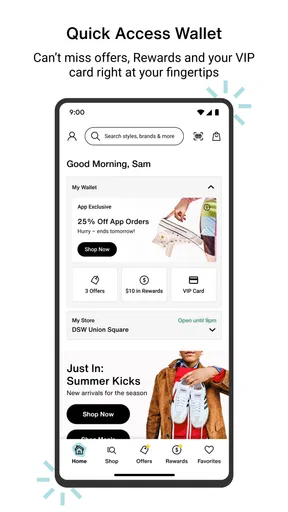
The home screen showcases the latest trends, which is perfect for those of us who like to stay on top of fashion. It’s visually appealing, with vibrant images that practically make you want to reach through your screen and grab those shoes. That image-led approach is useful for browsing by look, but it can be less efficient if I’m shopping with a strict list and want to get directly to a specific kind of shoe. In that case, I head to search and use filters rather than scrolling through featured styles.
Because footwear depends so much on fit and construction, I treat a product image as a starting point, not a substitute for checking the item details. Before I commit, I compare the available size and color options and look closely at the description. That extra pause matters more for shoes than for many everyday purchases: a style that looks right in a photo may still have the wrong heel height or feel too formal for the occasion I have in mind.
Browsing with a purpose
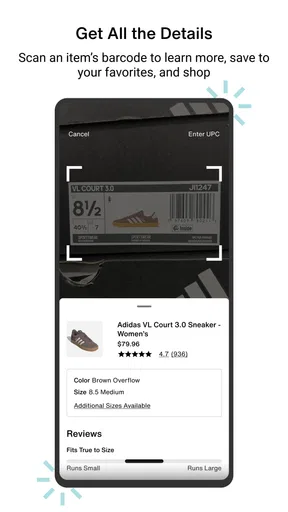
Now, onto the features! The app offers a ton of functionalities that make shopping a breeze. My favorite has to be the barcode scanner. Imagine you're at a physical DSW store, you see a pair of shoes you love, and you want to check if they’re available in a different size or color. Just whip out your phone, scan the barcode, and voila! All the info you need is at your fingertips.
I’d use that scanner as a bridge between trying something in person and continuing the search on my phone. If a style catches my eye but the size I need is not in front of me, scanning it gives me a practical next step instead of relying on memory to search later. It is also useful when shopping with someone else: I can capture the item I’m discussing, then check it without losing track of which shoe or color started the conversation.
Worth Reading Before You Choose

EA SPORTS FC Mobile 26 Is a Bigger Football Game, but It Takes Time

Flipboard Shows What News Apps Must Do Beyond the Feed

Switching to Android Auto Means Rethinking Your Driving Routine

Google Calendar Makes a Crowded Week Easier to Manage

Ludo King Makes the Most of the Minutes Between Plans

Baby Panda World Brings Quick Play to Modern Phones, but Its Game Library Feels Busy
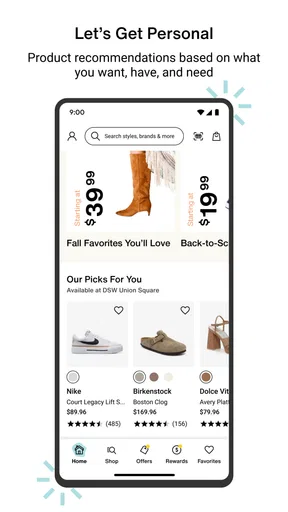
Another cool feature is the personalized recommendations. It's like having your very own shoe stylist. Based on your browsing history and purchases, the app suggests items that you might like. I found this super handy, especially when I didn’t know what I was in the mood for. It's like the app knows me better than I know myself!
There is a trade-off, though: recommendations can only be as helpful as the range of styles I’m willing to browse, and a run of similar suggestions can make discovery feel narrow. When I’m shopping for a specific need, I don’t let the recommendation feed make the decision for me. I use it for inspiration, then return to the filters to check whether there are other shapes or styles worth considering.
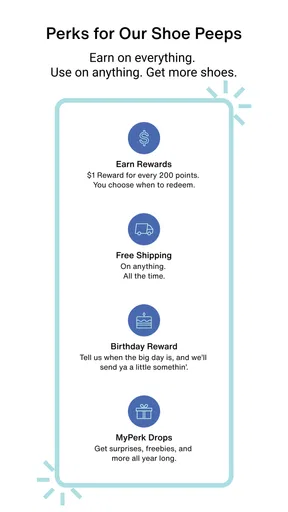
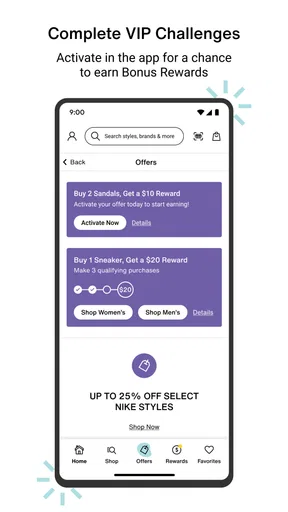
Can we talk about the rewards? The DSW VIP program is integrated right into the app, making it easy to keep track of points and snag rewards. Who doesn’t love getting a little something back for their purchases? For me, having rewards information in the same place as shopping is most useful when I’m already comparing options; it gives me a reason to check my account before placing an order rather than discovering later that I could have planned a purchase differently.
Motor and sensory comfort while shopping
For someone who prefers to do less tapping and scrolling, the barcode scanner and size, brand, style, and heel-height filters offer useful ways to reduce the amount of browsing. They do not remove every step, but they can turn an open-ended hunt into a smaller set of choices. I’d start with the most important constraint—usually size—then add only one or two style filters. Applying too many preferences at once can leave me with fewer options than I expected.
The image-heavy presentation is a plus if I want to judge a shoe’s general look, but it also makes the experience more visual than text-led. If bright product photography or a busy home screen is tiring, I’d skip the trend browsing and go straight to a focused search. I also find it easier to compare items when I look at them one at a time and keep a short mental or written note of the details I care about, rather than switching rapidly between several product pages.
In an everyday scenario, I might be at home with only a few minutes before heading out and realize I need a pair of comfortable-looking shoes for an upcoming event. I can search by size and heel height, scan a product I saw in a store earlier, and use recommendations only if I want alternatives. That focused route is more manageable than browsing the whole catalogue, especially when I’m shopping on a small screen or don’t want to spend long sessions comparing images.
Completing an order and choosing where to shop
Let’s get into the shopping experience because that’s what we’re here for, right? Browsing through the app is seamless. The search function is robust, allowing you to filter by size, brand, style, and even heel height. I can spend hours just browsing—it's almost therapeutic.
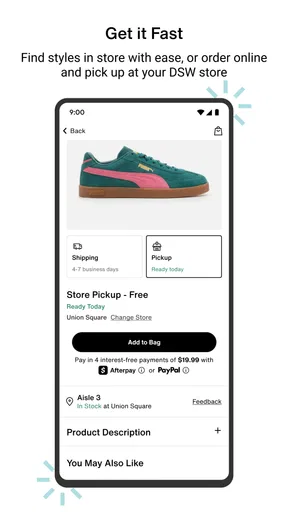
Once you find the perfect pair, the checkout process is just as easy. You can save multiple addresses and payment methods, which is a lifesaver for someone like me who loves to surprise family and friends with gifts. Plus, you can choose between shipping options or even opt for in-store pickup if you just can’t wait to get your hands on your new kicks.
That choice between delivery and pickup is a useful practical distinction. If I need to coordinate a purchase around a particular day, I would check the available option for the item and location before relying on a specific plan. Pickup also makes sense when I would rather deal with the purchase in person; shipping is more convenient when a store visit would add an unnecessary trip. For a gift, saved addresses can reduce checkout repetition, but I still take a moment to confirm the destination before placing the order.
Compared with shopping on a general marketplace, DSW’s focused shoe filters and store barcode workflow are the stronger reasons to use this app. A multi-retailer app may be better for comparing a wider mix of sellers, while a browser can be preferable if I’m already shopping across several stores and don’t want a separate app for each one. I’d choose this app when DSW is part of my shortlist, not as a replacement for every other way of buying shoes.
When the experience can get in the way
No app is perfect, and while I love the DSW Designer Shoe Warehouse app, there are a few things that could be better. For instance, the app occasionally logs you out, which can be a bit of a hassle if you’re in the middle of a shopping spree. But hey, a minor inconvenience for all the benefits it offers.
Also, while the app does a fantastic job at personalization, I sometimes found the recommendations a bit repetitive. But let’s be real, it’s hard to complain when you’re being shown great shoes.
Those are not the only situations where I’d slow down. Shoe shopping can hinge on fit, and browsing on a phone cannot tell me how a particular pair feels on my foot. If sizing or comfort is a concern, I would treat the app as a way to shortlist choices, then use an in-store visit when trying on the shoes matters more than convenience. Similarly, if I’m unsure about a gift recipient’s fit, checking the product carefully and choosing a shopping route I’m comfortable with is wiser than making a quick guess.
Account interruptions are especially frustrating if I’m midway through comparing products, so I avoid leaving a long shopping session until the last moment. I also don’t assume that a recommendation is the best match simply because it appears prominently. The useful habit is to keep my own criteria in view—size, intended use, style, and heel height—and let the app help me search rather than decide for me.
Access in different situations
The app is rated for Everyone and has an average rating of 4.4 from around 33 thousand ratings, with more than a million installs. That suggests it has reached a substantial audience, but popularity does not tell me whether every part of the interface will work well for every person. I’d judge its fit by the specific task: finding a shoe through filters is a different experience from visually browsing a trend-led home screen.
It can be convenient when I’m away from a computer, including when I’m in a DSW store and want to scan an item rather than search for it manually. On the other hand, a bright shop, limited time, or one-handed phone use can make detailed comparison harder. If the situation is distracting, I’d scan or note the product first and do the more careful comparison later somewhere quieter.
For people who rely on clear text, predictable controls, or non-visual ways of navigating, I would not assume that the image-led experience is automatically comfortable. The most practical test is to try a small task—such as searching for a known style and checking its details—before investing time in a large browse. If that route feels awkward, the DSW website or an in-person visit may be a better way to complete the same decision.
The app is free, and its current version is 4.200.0; it first arrived on May 24, 2017, and requires OS 9 or later. I’d check that my device meets the minimum before downloading, particularly if I keep an older phone for shopping tasks. Those details make it easy to judge whether trying the app is practical without treating it as a must-have for every shopper.
Who will get the most from it
I’d recommend the app to people who regularly shop at DSW, want a focused way to explore shoes and handbags, or like checking a store item from their phone. The combination of filters, barcode scanning, recommendations, rewards, saved checkout details, and delivery or pickup choices supports several different shopping habits without requiring me to start from a blank search every time.
I’d skip it if I only buy shoes occasionally and prefer to compare many retailers side by side, or if I need to try on every pair before considering a purchase. It may also be the wrong choice if a visual catalogue is uncomfortable to navigate or if repeated sign-ins would interrupt a time-sensitive order. In those cases, a browser, another retailer’s app, or an in-person visit could be a more sensible route.
Final Thoughts
Overall, the DSW Designer Shoe Warehouse app is a solid choice for anyone looking to simplify their shoe shopping. It’s packed with features that cater to both the casual shopper and the shoe aficionado. Whether you’re hunting for the latest trends or just need a reliable pair of sneakers, this app has got you covered.
If you haven’t already, I highly recommend downloading it and taking it for a spin. Who knows, you might just find your next favorite pair of shoes with a few taps on your phone. Happy shopping!
Pros
- Wide variety of shoe brands available.
- User-friendly interface with intuitive navigation.
- Exclusive discounts and rewards for members.
- Quick checkout process with multiple payment options.
- Easy access to order tracking and history.
Cons
- Limited international shipping options.
- Occasional app crashes during peak times.
- Some features require a stable internet connection.
- Customer support response time can vary.
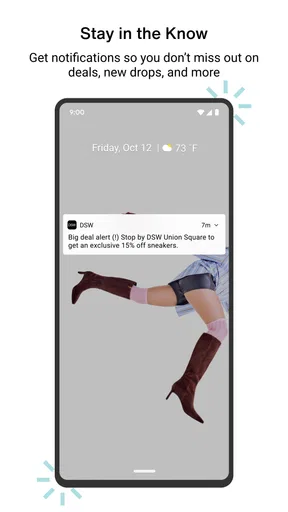
- Notifications can be overwhelming if not managed.
FAQs for DSW Designer Shoe Warehouse
What features does the DSW Designer Shoe Warehouse app offer?
The DSW app provides a seamless shopping experience with features like easy browsing of a vast selection of shoes, bags, and accessories. Users can access exclusive deals, track rewards, and enjoy a personalized shopping experience. Additionally, the app includes a barcode scanner to check prices and availability in nearby stores.
Is the DSW app user-friendly for online shopping?
Yes, the DSW app is designed with user-friendliness in mind. The intuitive interface allows users to quickly navigate through categories, filter search results, and easily manage their shopping cart. It also offers smooth checkout options, making online shopping convenient and efficient for all users.
Are there any exclusive benefits for members using the DSW app?
Absolutely! DSW VIP members can enjoy exclusive benefits through the app, such as early access to sales, special birthday rewards, and free shipping on select purchases. The app also allows members to track their points and reward certificates, maximizing their shopping experience.
Does the DSW app support in-store shopping features?
Yes, the app enhances the in-store shopping experience by allowing users to check product availability at nearby stores. The barcode scanning feature helps users quickly access product information and pricing. Additionally, the app can guide users to the nearest DSW locations, making in-store shopping easier.
How secure is the DSW app for making purchases?
The DSW app is equipped with robust security measures to protect user data during transactions. It uses encryption to secure payment information and offers multiple payment options, including secure credit card processing and digital wallets, ensuring a safe shopping experience for all users.


